The ClockHub Icon: Designing a Dial Backwards from 16 Pixels
A dial from an old longcase clock. CC0, via Wikimedia Commons
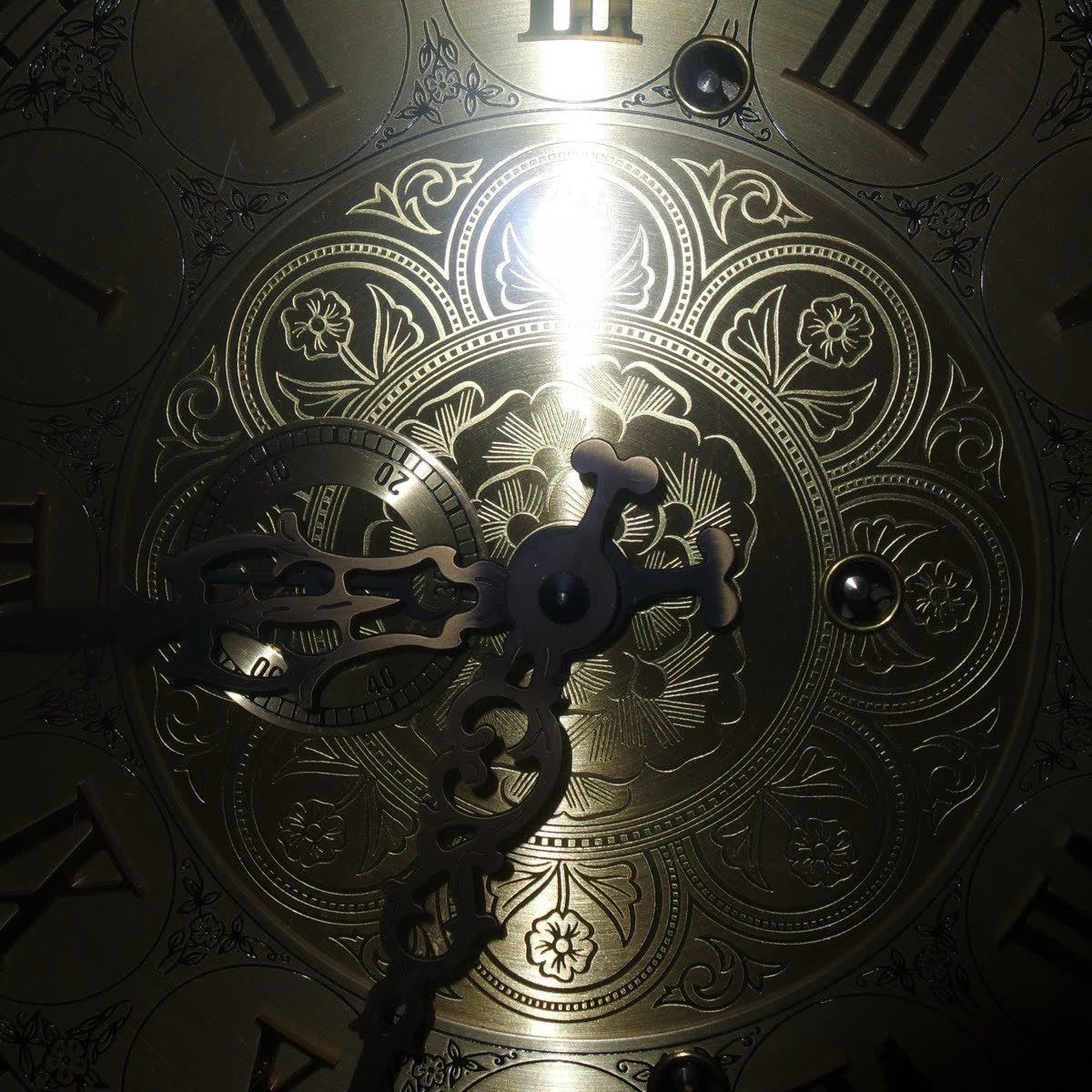
Nothing from this photograph made it into our icon.
No scrollwork, no Roman numerals, no piercing. What shipped is two colour schemes, fourteen files each, and the smallest of them is a 16×16 square containing twelve lines, two hands, and one red mark.
That is not a stylistic choice. If it were only about taste, we would have made it more refined. What actually decided the shape was a hard constraint: it has to be recognisable inside sixteen pixels.
So this is not an article about inspiration. It is about derivation — how each decision was forced, working backwards from 16 pixels.
I. How Many Marks Fit in a Square
The design canvas is 512×512 with a design radius of R=200. Scaled to 16 pixels, that is a ratio of 1:32.
So everything divides by 32:
- The dial's design diameter of 400 becomes 12.5 pixels
- The tick marks' outer radius of 190 becomes 5.94 pixels
- The entire visible width of the dial is under 12 pixels
That is the whole budget. There is no slack, no padding left to squeeze.
So how many marks fit? Work out the circumference — radius 5.94 pixels, circumference 37.3 pixels:
| Marks | Gap between neighbours |
|---|---|
| 60 | 0.62 px |
| 24 | 1.55 px |
| 12 | 3.11 px |
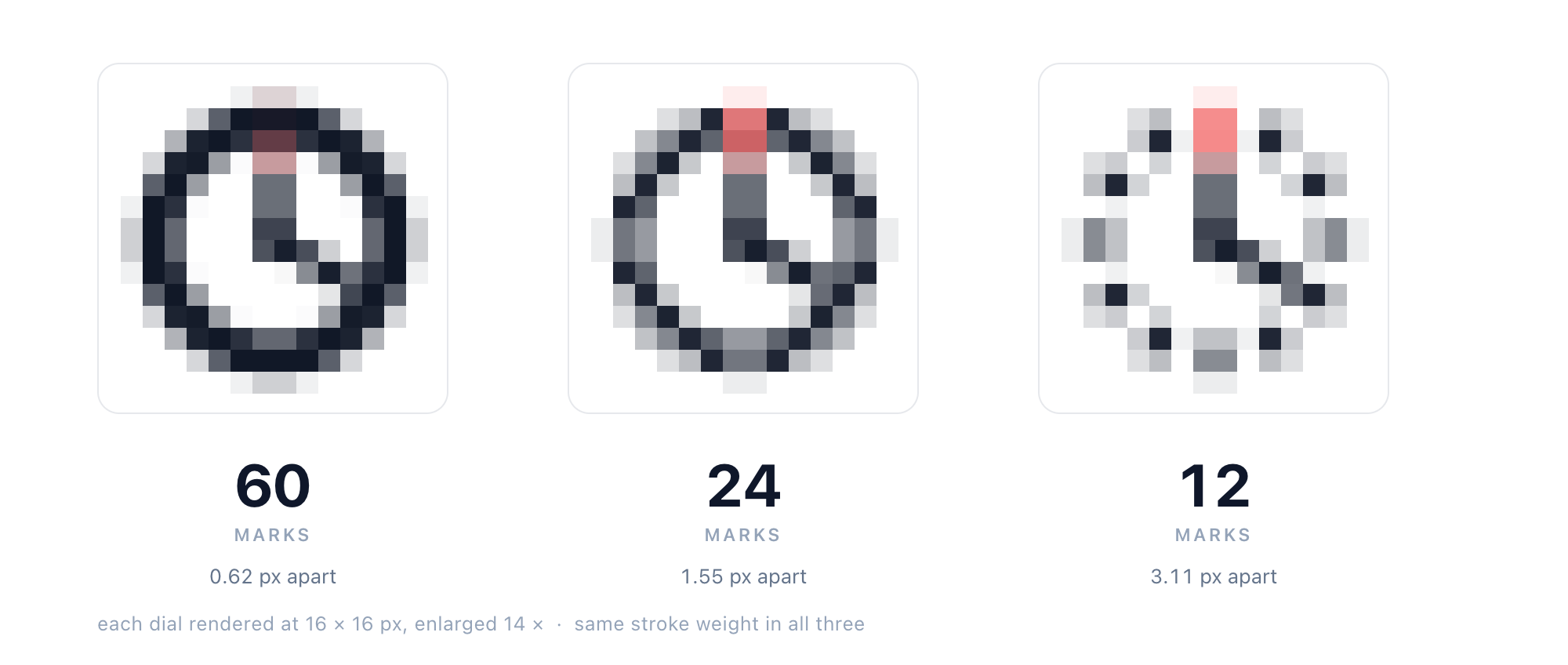
All three thickened to 1.1 px — the only variable left is how many marks there are
The famous Swiss railway clock at Zürich Hauptbahnhof carries 60 marks on its face: twelve heavy ones for the hours, forty-eight fine ones for the minutes. It is the high point of this design lineage — but compress those 60 marks proportionally into 16 pixels and they fuse into a solid ring. You could not even tell it was a clock.
Which gives the most important sentence in this article:
Stroke weight can be thickened. Spacing cannot.
A line 0.6 pixels wide can be thickened to 1.1, or 2, and it is still that line. But a 0.62-pixel gap between two lines cannot be widened by any means — except by removing what sits between them.
The count went from 60 to 12 not because we prefer 12, but because 16 pixels only holds 12.
II. The Subtraction List
The shape was not settled in one pass. The icon tuner still keeps three generations of parameters, and every value that changed is recorded in scripts/icon/tuner.html:
| Version | Tick width | Hand width | Hub | Hour angle | Minute angle |
|---|---|---|---|---|---|
| Reference | 15 | 16.5 | none | 10° | 125° |
| Thin (previous) | 4.0 | 4.8 | r = 5 | 0° | 120° |
| Final | 10 | 12 | r = 12 | 0° | 120° |
(Lengths and widths are percentages of the radius R, so 10 means the stroke is 10% of 200 — twenty design pixels.)
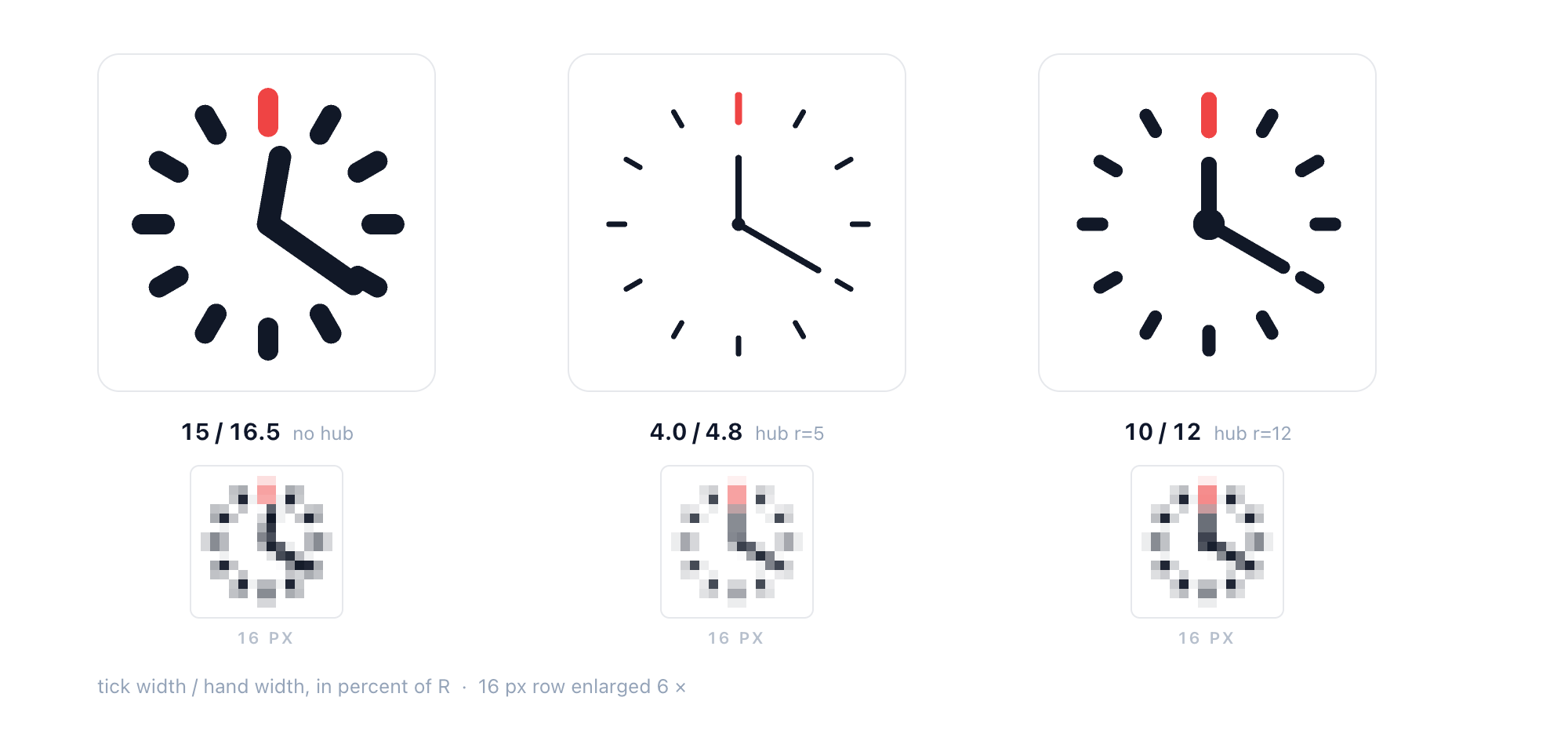
Three generations, and what each of them looks like at 16 pixels
The first version followed the reference: heavy ticks, heavy hands, no hub. It carried real weight at large sizes, but up close it read as blunt, so the thin version followed — ticks at 4.0, hands at 4.8, a clean line, the hub pulled in to r=5. The thin version is the best-looking of the three.
Then it disappeared at 16 pixels.
Not "it looked worse" — it could not be drawn at all. The thin version's tick is 4.0 wide, which is 0.25 pixels at 16. The thickening rule would compute a factor of 4.4, but the cap sits at 3.2 — so even at maximum boost the tick reaches 0.8 pixels, still short of the 1.1-pixel floor.
The final version is a step back: ticks at 10, hands at 12, hub at r=12. It is less elegant at large sizes than the thin version, but it is the only one where 16 pixels still reads as "twelve marks and two hands".
The lesson: good-looking is a local optimum at one particular size. You have to make the decision at the smallest size and accept whatever that gives you at the largest.
III. A Dial That Tells No Time
The final hour hand points at 0° and the minute hand at 120°. This dial reads 12:20.
And 12:20 is a fake time. On a real clock, when the minute hand reaches twenty past, the hour hand has already moved a third of the way off twelve — to 10°. The reference version was at 10°, and it was correct.
Pulling the hour hand back to 0° puts it on the same radius as the red mark at twelve. From the centre upward, the lower half of the hand and the red mark become one line — at a glance, a single needle with a red tip.
The minute hand moved from 125° to 120° for the same kind of reason: both 0 and 120 are multiples of 30, so each tip lands exactly on a mark — the hour hand on the red mark at twelve, the minute hand on the mark at four. In the reference version both stopped between marks: 10° wedged between twelve and one, 125° wedged between four and five.
Neither of these decisions has anything to do with 16 pixels. At that size, five degrees moves the minute tip 0.35 pixels and ten degrees moves the hour tip 0.49 — invisible. They are compositional decisions made for 220 pixels and up.
But the direction is the same: snap to the grid, not to the truth. The twelve marks are the only coordinate system this figure has. A tip either lands on a mark or between two; the first reads as designed, the second reads as placed at random.
A word on the famous 10:10 in watch advertising: its hour hand is at 305°, its minute hand at 60°, so the angle is actually 115° — also not on the marks. We did not copy it.
The cost is that this dial no longer shows a real time.
An icon does not tell time. It says "this is a clock", not "it is twenty past". When those two goals conflict, legibility wins and accuracy loses.
IV. The Minimum Width of a Line
Back to that 0.625-pixel problem.
A line 0.625 pixels wide is not a thin line on screen — it is a row of pixels at varying grey. The renderer spreads it across two neighbouring pixels, half the density each. What should be an ink-black tick becomes a pale grey haze.
The fix in scripts/icon/generate.mjs is to write the minimum width down as a number:
const MIN_PX = 1.1 // a tick may never be thinner than this in output pixels
const MAX_BOOST = 3.2 // but never scale more than 3.2×, or it turns into a blob

function boostFor(size) {
  const tickPx = ((SHAPE.tick.width / 100) * SHAPE.R * size) / CANVAS
  const k = MIN_PX / tickPx
  return Math.min(MAX_BOOST, Math.max(1, k))
}
The logic runs backwards: it does not ask "how much do we scale at this size", it asks "how much scaling does it take to reach 1.1 pixels". That factor is then multiplied back into stroke width and stroke length.
Run all ten output sizes through it:
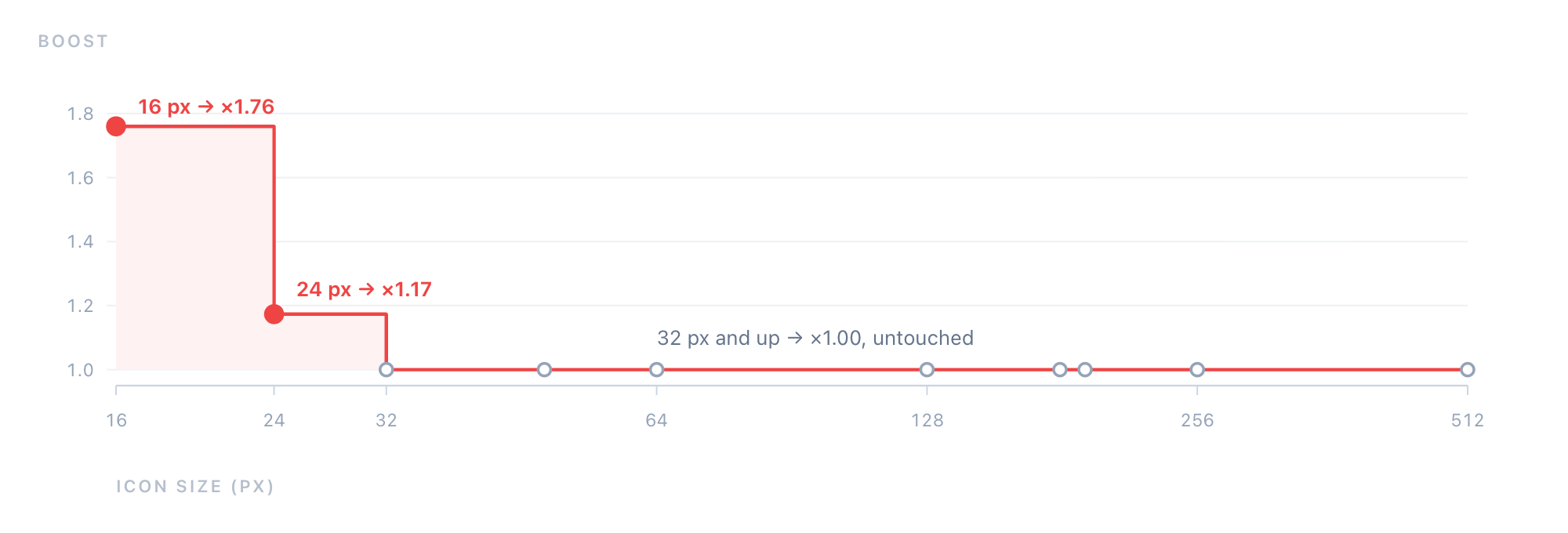
Only 16 and 24 are ever modified; from 32 pixels up nothing changes
Only 16 and 24 are touched. At 32 pixels the stroke is already 1.25 pixels, above the floor, and the factor is exactly 1.00 — the code does nothing. That is the best property of this mechanism: it is a safety net, not a style.
One easily missed detail: when a stroke thickens, its length has to grow too.
const grow = 1 + (k - 1) * 0.35 // lengthen, so thickening doesn't turn it into a dot
const hubGrow = 1 + (k - 1) * 0.4 // the hub grows more conservatively
Because every endpoint is a round cap (stroke-linecap: round). A tick 48 long and 20 wide, thickened to 35 wide with its length unchanged, is no longer a tick — it is a capsule. Thicken it a little more and it is a circle. So when width multiplies by 1.76, length multiplies by 1.27 — a little over half as much, just enough to keep the shape of a long thin bar.
The hub is more conservative still (0.4 rather than 0.35) because it is already nearly circular, and growing it further would eat the base of both hands.
We did not invent this. Apple's Human Interface Guidelines state it plainly: "avoid extremely thin line weights and sharp corners, because they tend to lose detail and crispness in smaller icon sizes at lower resolutions." Google went further and turned it into a font axis — the opsz (optical size) parameter on Material Symbols runs from 20dp to 48dp, because "for the image to look the same at different sizes, the stroke weight changes as the icon size scales."
The only difference is that they draw several sets by hand. We let code compute it.
V. Two Backgrounds
The icon has no outer ring.
That is not a styling preference, it is an accounting decision. A ring costs at least two pixels of width, and on a 16-pixel dial that is 16% of a 12.5-pixel diameter. Remove it and the marks can push outward, and the whole figure gets bigger.
But removing the ring has a cost: the shape loses its own boundary.
An icon with a ring is "a circle" on any background. Without one, twelve floating lines have to lean on a known ground — either you give them a plate, or you guarantee they land on white.
Hence two colour schemes with a clear division of labour:
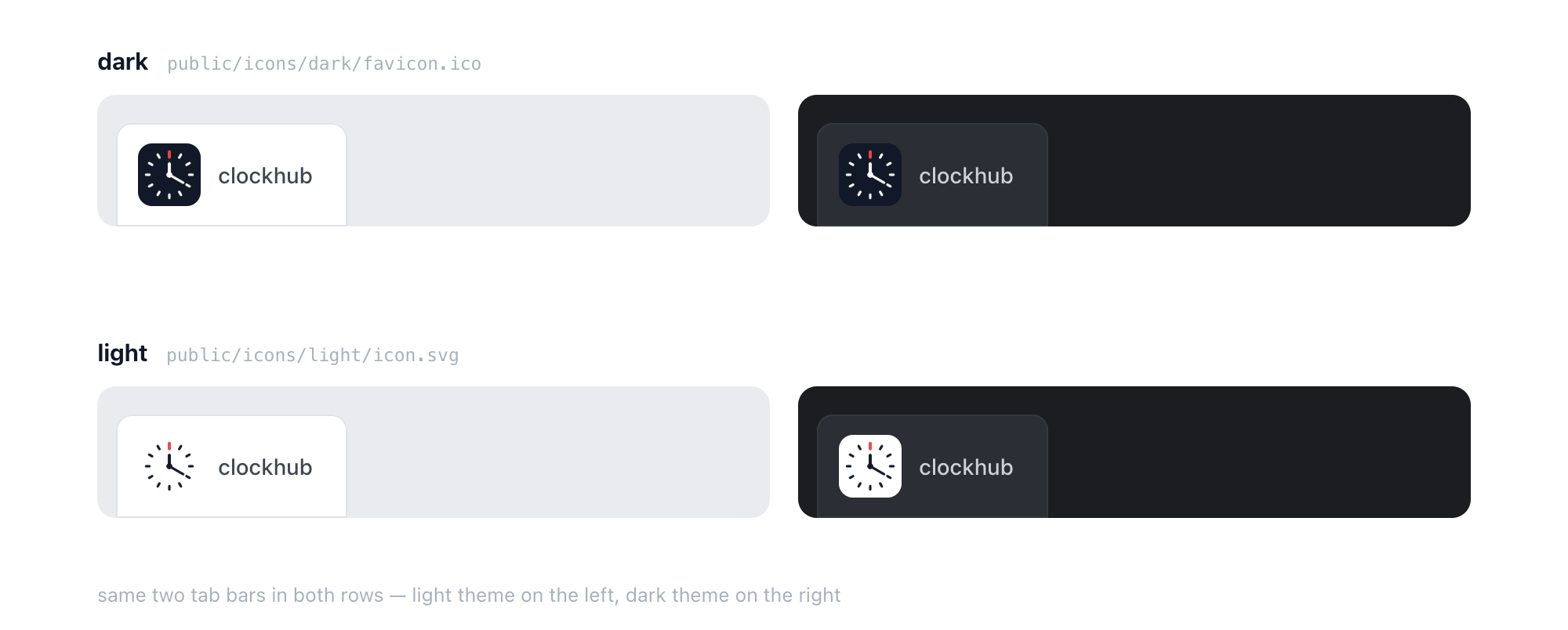
The same two tab bars, with each icon
- dark (black plate, white hands):
public/icons/dark/, used in browser tabs. The tab bar is browser chrome — the icon has no way of knowing whether it will land on a light or a dark theme, so it needs one solution that works in both. A dark plate is an unmistakable dark square on a light tab bar, and the white hands still pop on a dark one. - light (white plate, black hands):
public/icons/light/, used in the site header, OG images, and the iOS home screen. Those backgrounds are ours to control.
That decision lives in a single line of src/lang/seo.ts:
icons: { icon: '/icons/dark/favicon.ico', apple: '/icons/light/icon.svg' }
favicon takes dark; apple-touch-icon takes light. The first faces an unknown background on its own; the second lands on the pale wallpaper of an iOS home screen.
The site header uses a third form: clock_mark.tsx has plate defaulting to false, drawing no plate at all and putting ink-coloured lines straight onto the white header. One set of geometry, three ways of carrying it: dark plate, light plate, no plate.
The iOS version adds one more rule: it cannot be transparent. iOS fills transparent regions with black, so an icon with a transparent background becomes a black square on the home screen. The 180-pixel apple-touch-icon is therefore rendered together with its plate, not as a ring of floating lines.
VI. Why Not Just Screenshot It
The icon script does not call Chrome. It does not call rsvg-convert. It installs no npm packages.
It implements two things itself: a rasteriser and a PNG encoder.
The reason is in the header comment of the script:
Icons need to be pixel-exact and byte-identical on every run. External tools bring their own scaling strategy, background colour and DPR, all of which change the result. This supersamples 4–8× and rasterises on its own, depending only on Node's built-in zlib — so the PNG that comes out on another machine is not one byte different.
Concretely: sample the shapes at four to eight times the target resolution (a 16-pixel icon is sampled at 128×128), test each subsample point against each shape to get a colour, then box-average 8×8 blocks back down to 16×16. Anti-aliasing is computed, not guessed by a renderer.
const ss = Math.max(2, Math.min(8, Math.ceil(2048 / size)))
Small icons get more supersampling (8× at 16 pixels), large ones get less (4× at 512) — because the absolute sample density stays roughly pinned around 2048.
The encoder is hand-written too: IHDR / IDAT / IEND chunks plus CRC32 for PNG, an ICONDIR with embedded PNGs for ICO. It sounds intimidating and is under a hundred lines. The payoff is size — a 512×512 icon comes out at 7 KB, a 16-pixel one at 319 bytes.
The real point is not saving a dependency. It is turning the icon into a build artifact.
An icon produced by code can go into git, can be diffed, can be re-run. Change one number and all twenty-eight files across both schemes are regenerated — no asking a designer for another round of PNGs, no wondering whether someone forgot to tick a box on the last export. The icon stops being "an image" and becomes "a description that can be executed".
VII. One JSON, Two Consumers
The shape has exactly one source of truth: src/constants/clock_icon.json. Thirteen lines, fifteen numbers, one boolean, three colours.
{
  "canvas": 512,
  "R": 200,
  "plateRadius": 0.16,
  "tick": { "len": 24, "width": 10 },
  "redTick": { "len": 35, "width": 12 },
  "hour": { "len": 45, "width": 12, "angle": 0 },
  "minute": { "len": 65, "width": 10, "angle": 120 },
  "hub": { "r": 12, "width": 3, "fill": true },
  "ink": "#111827",
  "paper": "#ffffff",
  "red": "#ef4444"
}
Two things read it:
scripts/icon/generate.mjs— produces the 28 static filessrc/app/[lang]/components/clock_mark.tsx— the animated logo in the header and footer
This is the least conspicuous and most important rule in the whole system: the static icon and the logo on the page cannot drift apart, because they are computed from the same numbers.
The header version also does one thing more — it turns.
Hover it and the hands start spinning: the minute hand at 840 degrees per second (about 2.3 revolutions), the hour hand following at a strict 1:12 gear ratio. Let go and it does not stop dead — it works out how far it needs to travel to reach the resting angle, then eases through that distance over 0.7 seconds with a cubic ease-out, landing back on 12:20.
There is one compromise that has to be made here. A real clock's gear ratio is 1:12 — the minute hand turns 360° while the hour hand moves 30°. Which means at a true ratio the two hands can never both return to their starting positions: by the time the minute hand is back at 120°, the hour hand is definitely not at 0°. So during those 0.7 seconds the gearing is released, and each hand takes its own shortest path home. You cannot see it, and both hands land exactly where they started.
One more rule: if the system asks for reduced motion (prefers-reduced-motion: reduce), the hands do not spin at all.
VIII. The Smallest Interface
A 16-pixel icon is the smallest interface you can build.
It has no tooltip, no hover state, no retry button for when it fails to load, no empty state. It gets one chance: the glance in which it is recognised. Nobody studies it, nobody learns it, nobody lingers half a second longer because it was cleverly made — they are just looking for the right one among a dozen open tabs.
That constraint deletes every decorative option. What remains has to hold up on its own: twelve marks say "clock face", two hands say "it moves", one red mark says "not the icon next to it".
The maker of that longcase clock was probably thinking along similar lines. He was not working with sixteen pixels but with a brass plate half a metre across, so he had the budget to engrave flowers, cut numerals, pierce the hands. We had sixteen pixels, so we kept twelve lines.
Same object. Different budget.
To see what these lines look like at a normal size, Analog Clock draws a working dial from the same geometry; to see time handed over to digits entirely, Flip Clock is the answer in the other direction.